Miscellaneous 3D graphics demos
Table of Contents
Back to BASIC applications collection
1. Rotating exclamation mark
Wireframe 3D model of a rotating exclamation mark.
A white wireframe exclamation mark tumbles against the black screen, its beveled bar and dot alternately foreshortening and opening up as they turn. The model is defined by DATA statements: 32 vertices describing front and back faces plus the lines joining them. Each frame rotates every vertex with precomputed sine and cosine lookup tables and connects the projected points with lines. Arrow keys and w/z steer the rotation, space slows it down.
2. 3D bouncing ball
This QBasic program creates a visually engaging 3D animation of a point-cloud ball bouncing around the screen. The program is an example of early computer graphics techniques.
A sphere woven from 500 glowing points bounces around the dark screen, tumbling as it travels and kicking off in a new direction with every impact. Each point is rotated by three successive 2D rotations, perspective-projected, and then offset by the ball's position. Gravity accelerates the ball downward each frame; when it crosses the floor or a side wall its velocity is inverted, a random horizontal kick is added, and new spin velocities are chosen for the point cloud.
3. 3D bouncing cubes on grid floor
3D wireframe cubes bouncing on a grid floor, creating an immersive and dynamic visual effect.
Wireframe cubes leap and bounce above a glowing green grid floor while the camera drifts among them. The floor is a lattice of points joined into a mesh; each cube is a separate point set with its own velocity vector that is integrated every frame and inverted by the collider logic whenever a cube hits the ground. Arrow keys fly the camera around the scene, the numeric keys 2/4/6/8 turn the view, and +/- adjust its altitude.
4. Matrix math for rotation in 3D space
Instead of combining simple 2D rotors, pixels in this 3D space are rotated by using matrix multiplications.
A rippling white surface made of a point grid twists into new orientations between frames. The height of each grid point is computed as a sine wave of its Manhattan distance from the center, producing concentric dunes. Instead of chained 2D rotors, every point is transformed in a single step by a 3x3 rotation matrix built from the alpha, beta and gamma angles, then perspective-projected; keys 7/9, 4/6 and 1/3 nudge each angle.
5. Maze explorer
The Evolving 3D Maze Explorer is a QBasic program that generates and navigates through a dynamically evolving 3D maze. This program is an excellent example of early 3D graphics programming and provides an interactive experience where users can explore a maze that grows and changes as they navigate through it.
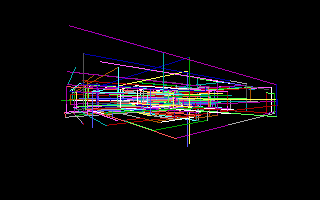
A tangle of brightly colored line segments stretches into the darkness: the maze is a single 3D random walk in which each new segment picks a random color and a random displacement along one axis. Only 500 points exist at a time, so as the walk continues the oldest geometry is recycled and the labyrinth appears to grow and rebuild itself endlessly around the viewer. Navigation uses WASD plus the TSR mouse driver: dragging looks around, and mouse button combinations slide the camera along the axes.
The viewpoint plunges down a corridor of brightly colored line segments that stretches away in one-point perspective, fresh geometry appearing ahead as the flight continues. Each frame the random walk appends another point and a randomly colored line along one axis, up to a 500-point cap; every vertex is then rotated, perspective-projected and joined with LINE. Mouse drags steer the view while WASD slides the camera through the maze.
6. Tank animation
Animated tank driving through the bridge back and forward. User can look and fly around in all directions.
A green wireframe tank shuttles back and forth across a long wireframe bridge, its track links visibly churning in sync with the movement. The tank, bridge and track segments are all built from DATA statement coordinates; the track animation recycles a pool of small segments around the wheels as the tank drives. Rotation uses precomputed sine/cosine lookup tables, and the arrow keys plus +/- provide a freely flying camera around the scene.
7. Tiled room
Room with some tiles on the wall and on the floor. User can freely fly around.
The camera sweeps through a spacious wireframe room decorated with geometric tiles: square and hexagonal outlines pattern the floor and walls in green and white. The tiles are generated procedurally - helper subroutines stamp out squares, hexagons and cube edges as point-and-line data - then every vertex is rotated with precomputed trigonometric tables and perspective-projected. Cursor keys fly the camera, 2/4/6/8 tilt the view, and space slows the movement.